Installing Clash (Box for Root)
Description
Clash lets you set up a transparent proxy on Android devices with Root. It's part of the Box for Root module for Magisk.
You'll need this program to Set up a proxy in Clash mode.
On emulators ZennoDroid puts its own copy of busybox in place, while on a real device BusyBox has to be installed by hand — see Installing BusyBox. Otherwise installing Clash ends with the Please Update BusyBox to version 1.36.1+ error.
Automatic Installation
The Box for Root module is installed automatically when configuring a proxy in Clash mode for the first time.
Automatic Updating
If Clash is already installed on the device, it will not update automatically.
To update an installed version, you need to perform the following steps:
- Remove the installed Clash. To do this, execute the Adb Shell action with superuser (root) privileges enabled:
rm -rf /data/adb/box - After that, set up the proxy in Clash mode. The new version will be installed automatically.
Manual Installation
Box for Root installs automatically the first time you use a proxy in Clash mode.
To install the module, you'll need a phone with Magisk.
Download the latest version of Box for Root to your phone's sdcard/Download/ folder and install it using the standard menu.
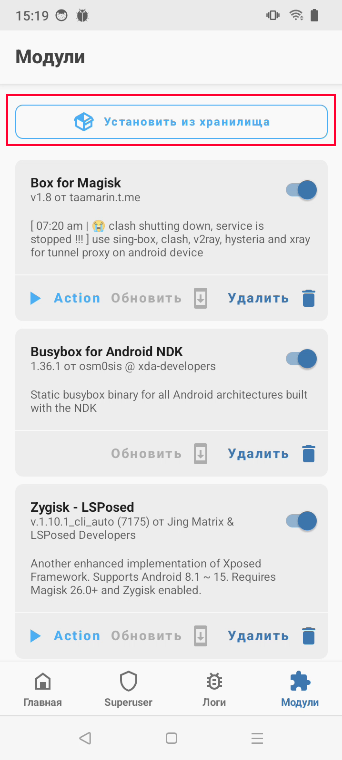
1. Open Magisk → go to the Modules tab → Install from Storage.
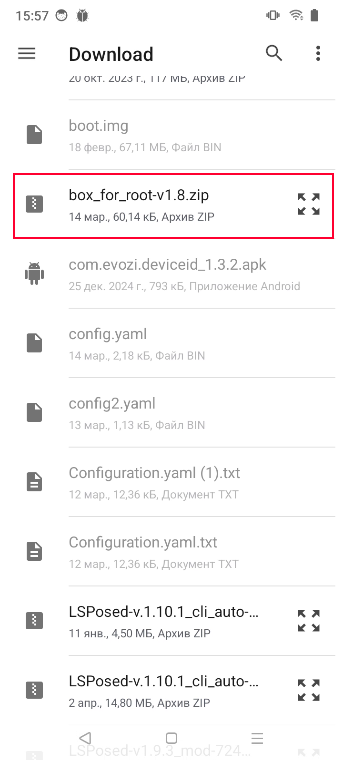
2. Find the installer among your downloaded files.
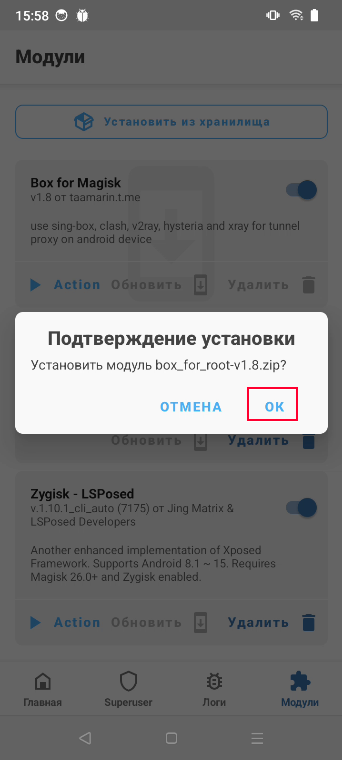
3. Confirm the installation.
4. During installation, you'll see the message Do you want to download Kernel in the log
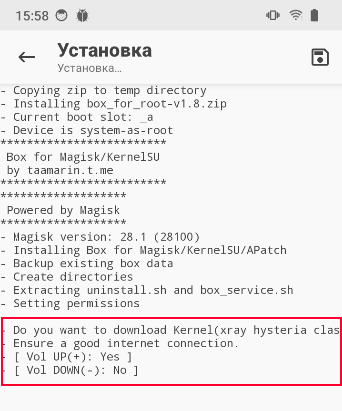
At this point, you need to hold down the volume up button on your phone. This will start downloading the extra files needed for the module to work.