Notification (Log Entry)
🔗 Original page — Source of this material
Description
This block lets you notify the template user about events and actions happening in your project. Messages will show up in the ❗→ Log window.
How to add this action to your project?
Through the context menu Add action → Logic → Notification
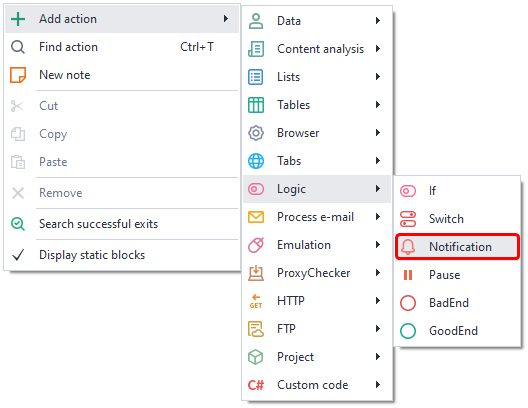
Or use the ❗→ smart search.
Where can this be used?
- Logging actions in the template
- Notifying users about changes
- Notifying about the template version
How to use the action?
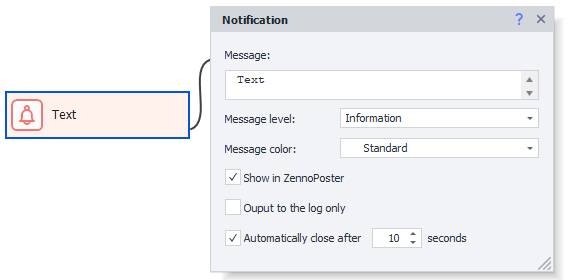
Message Text
Enter the text that will appear for the user here. You can use any macros.
Message Level
The only difference is the icons shown before the message.

In the Log window, you can sort messages by type.
Message Color
Added in ZennoPoster 7.2.1.0
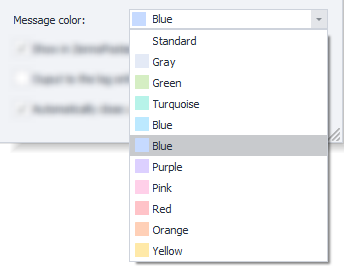
Lets you choose a background color for the message in the ❗→ log window.

In the Log window, you can sort messages by their color.
Show in ZennoPoster
If checked, the notification will appear both in ProjectMaker and ZennoPoster.
If unchecked, it will only appear in PM.
Only output to log
If checked, the notification will show only in the log and will not pop up on the desktop.
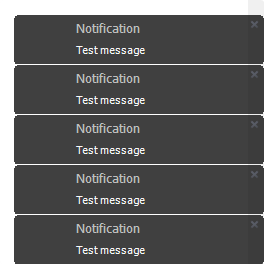
In the program settings, you can enable the option "Only output notification to log" and then all messages will ALWAYS appear ONLY in the log.
Auto close after N seconds
This option sets how long the notification will stay on the desktop when it pops up.
Example of use
For example, you can notify the user about successful completion of an action, stages of template work, number of processed items, and so on.