Pause
This action lets you stop running the project for a set amount of time in seconds.
Used for:
- Waiting until the app fully loads
- Making things look more human with random pauses
- Setting pauses between different actions
How do I add it to my project?
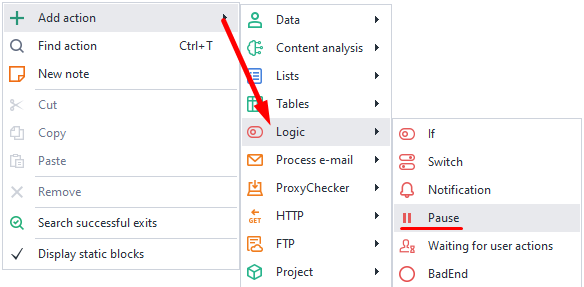
Through the context menu: Add action → Logic → Pause.
How does this action work?
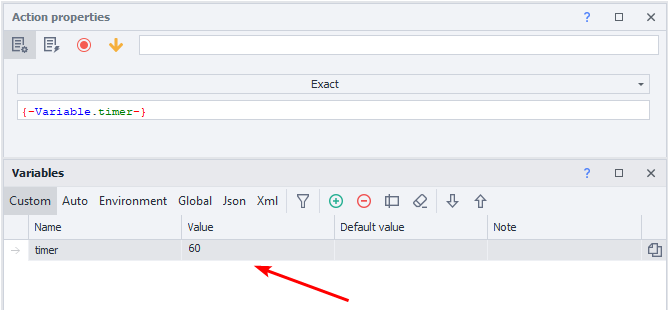
If you use variables, the value must be numeric.
Exact pause.
The project will stop for the exact number of seconds you set. You can enter a number or use a variable.
Interval pause.
You set a pause within a certain range of seconds, you can use variables too.
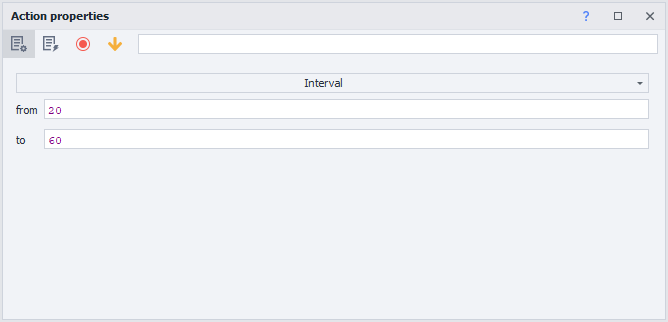
- FROM. Minimum time in seconds.
- TO. Maximum pause in seconds (NOT INCLUDED).
For example, with the settings in the screenshot, the project will wait for a randomly chosen time between 20 and 59 seconds.
Example.
Say you need to do a few similar things in your app. So it doesn't look robotic because everything runs instantly, we suggest adding random pauses between actions.
It can look like this:
- Open the app.
- Do what you need to do.
- Set a pause within an interval.
- Do the next actions.
Adding pauses like this makes the site think there's a real user, not a bot.