Working with Cookies
🔗 Original page — Source for this material
Description
Added in ZennoPoster 7.3.1.0
This action lets you manage your project's cookies. You can import, export, and clear cookies. For loading or saving, you can use either a file or a variable. Both Netscape and JSON formats are supported (❗→ Netscape cookie file format ❗→ Json cookie file format).
Goes perfectly with the ❗→ Cookie Management Tool.
How to add this action to your project?
Via the context menu Add Action → Browser → Cookie Management
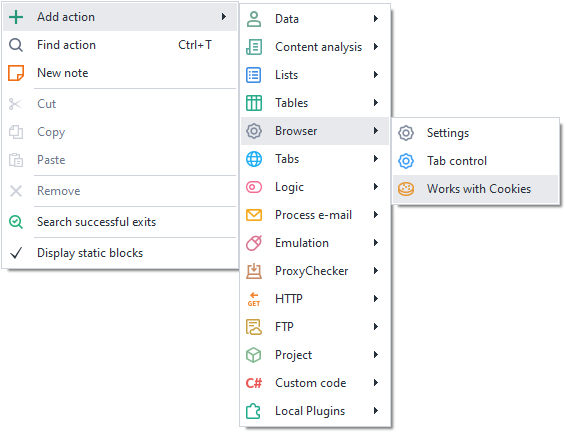
Or use the ❗→ smart search.
Where can you use this / What is it for?
- Import cookies from purchased accounts
- Export cookies for use in a regular browser
- Add missing cookies to a profile
How to work with the action?
Import
Loads cookies into the profile for use in a project, with or without a browser.
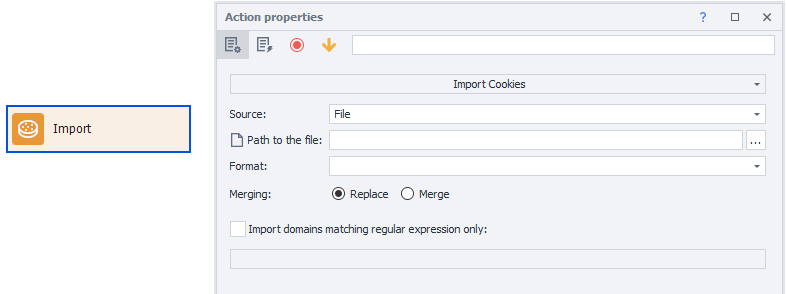
Source
Choose where the cookies will be loaded from: a *file or a ❗→ *variable.
File path
This option is shown if you chose File as the Source.
Specify the full path to the file from which cookies will be loaded.
Variable
This option is shown if you chose Variable as the Source.
Select the variable where your cookies are saved.
Format
Here you need to select the format for the cookies to be loaded. The available options are JSON and Netscape (❗→ Netscape cookie file format ❗→ Json cookie file format).
Merge
Replace – existing cookies will be deleted before setting new cookies.
Merge – existing cookies in the browser will be merged with the loaded cookies.
When merging, if a cookie name matches, the browser’s cookie will be replaced by the imported one.
Import only domains matching the regular expression
If you want to load cookies only for certain domains, enable this setting and enter a ❗→ regular expression.
Export
Exports the current cookies.

Where to save
Select where the cookies will be saved: to a *file or to a ❗→ *variable.
File path
This option is shown if you chose File as Where to Save.
Specify the full path to the file where cookies will be saved.
Variable
This option is shown if you chose Variable as Where to Save.
Select the variable where cookies will be saved.
Format
Here you need to select the save format for the cookies. The available options are JSON and Netscape.
Export only domains matching the regular expression
If you want to save cookies only for certain domains, enable this setting and enter a regular expression.
Clear Cookies
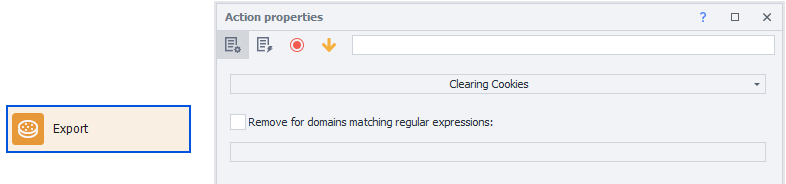
A block with this property will clear browser cookies completely for all sites, or only for specified domains using ❗→ regular expressions. Works similarly to the action in the ❗→ Browser → Settings group.