AI Agent
Description
This action is used to work with LLM providers (OpenAI, Anthropic, DeepSeek, Gemini, Perplexity). It allows you to send a text prompt from a request or variable and receive the response into a variable.

How to add the action to a project?
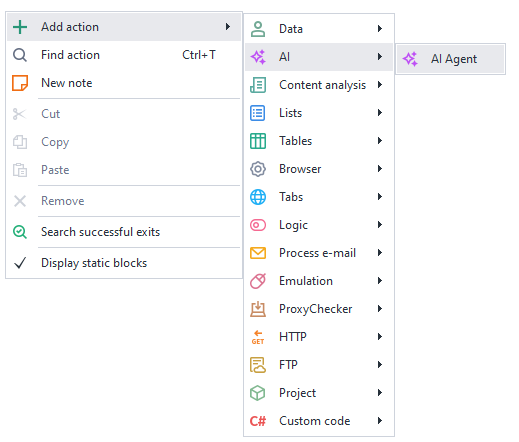
Via the context menu: Add action → AI → AI Agent
What is it used for?
- Maintaining a conversation with an AI
- Writing and generating articles, posts, and texts
- Creating and applying prompts
- Analyzing and classifying data
- Automating content creation
How it works
Basic settings

- Select the LLM module from the dropdown list.
- You must first enter your API key for the service in the settings.
Model

Model — the name of the LLM model that will be used for text generation.
After selecting a provider, the list of models is automatically loaded into the dropdown list. If you are using your own LLM service, enter the model name manually.
The selected model affects:
- response quality;
- generation speed;
- request cost.
Token limit
Token limit — a parameter that restricts the maximum number of tokens the model can generate in a response.
Suitable for:
- controlling response length;
- reducing API request costs;
- decreasing generation latency;
- preventing excessively long responses.
Details:
- only output tokens are counted, not the input prompt (control the input prompt in the "Request text" field);
- if the limit is reached, generation stops;
- too small a value may cut off the response mid-sentence.
The default value is 400. Increase it if you need longer responses (you can also add an additional constraint in the prompt text, for example — "Comment no longer than 300 characters").
A token is a chunk of text, so the length depends heavily on the language and content.
Approximate estimates for modern LLMs:
| Language | 1 token ≈ | 100 tokens ≈ |
|---|---|---|
| English | 3–4 characters / ~0.75 words | ~70–80 words |
| Russian | 2–3 characters / ~0.4–0.6 words | ~40–60 words |
| German | 2–4 characters | ~50–70 words |
| Chinese | 1–2 characters | ~100–150 characters |
| Japanese | 1–2 characters | ~80–120 characters |
| Code | highly syntax-dependent | often more tokens than plain text |
Russian text is usually "more expensive" in tokens than English text of the same length.
Temperature
Temperature — a parameter that controls the degree of randomness and creativity in text generation.
How it works:
- low values → responses are more precise, predictable, and stable;
- high values → responses are more diverse, creative, and unexpected.
Typical range: from 0 to 2 (depending on the LLM).
Practical usage:
0.0–0.3→ code, SQL, documentation, precise answers;0.4–0.7→ regular chat and most tasks (default);0.8–1.2+→ creativity, ideas, storytelling.
Details:
- Temperature
0does not guarantee 100% identical results, but makes responses maximally deterministic; - high temperature increases the likelihood of unusual phrasing and errors.
Request text

Request text (or prompt) — the instruction and input data passed to the model to generate a response.
Variable and project macros can be used.
The prompt determines:
- what the model should do;
- what format to respond in;
- what style to use;
- what data to analyze.
A good prompt typically includes:
- the task;
- context;
- constraints;
- the desired response format.
Example of a good prompt for x.com
You are an active Crypto Twitter user.

Write a reply to the post in the style of an experienced crypto/AI user.

Tone:
- smart but not overly formal
- short and to the point
- meme phrases are allowed
- maximum 280 characters
- no hashtags
- no emoji-spam

Post:
{-POST_TEXT-}

Return only the reply.
Save to variable
Select the variable where the result will be returned.