Regexp Tester
Description
Regular expressions are a kind of filter for searching text strings that match the conditions you set.
Our built-in builder lets you quickly create rules without digging into all the nitty-gritty details.
Where are regular expressions used?
- Extracting info from website pages
- Filtering data in lists and tables
- Finding registration confirmation emails or links
- Locating specific parts of text
- Identifying rows to delete in lists
- And tons of other handy uses
Regular Expression Builder
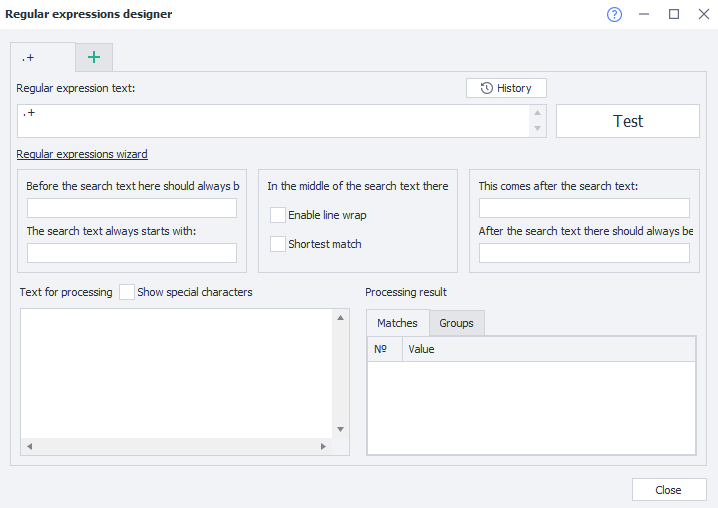
How to open it
There are two ways:
Using the Toolbar

From the Tools dropdown

Working with the window
Tabs
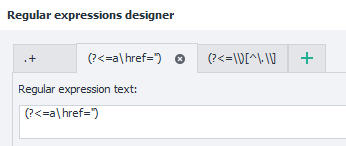
You can work on several regular expressions at once in different tabs. The tab name is based on the expression’s text.
History
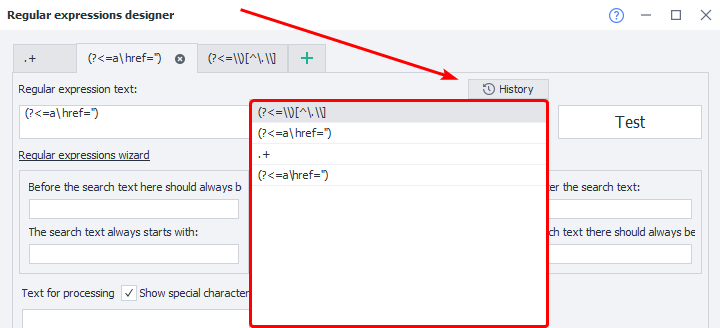
All expressions you’ve previously tested with the Test button are saved here.
Regular expression text
This field holds the expression text built from your parameters. You can also edit it manually.
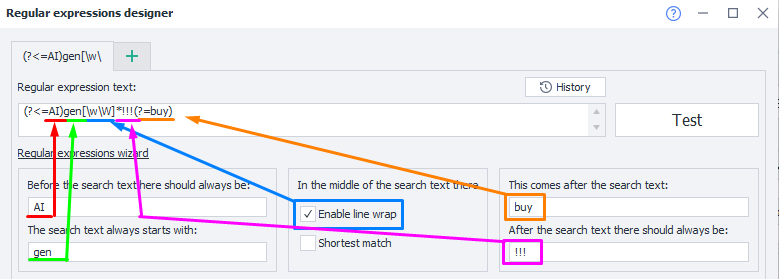
All manual edits you made in the expression field will be lost forever.
The “Test” button
When you press this button, your expression will be applied to the Text to process, and the result will show up in the Processed result.
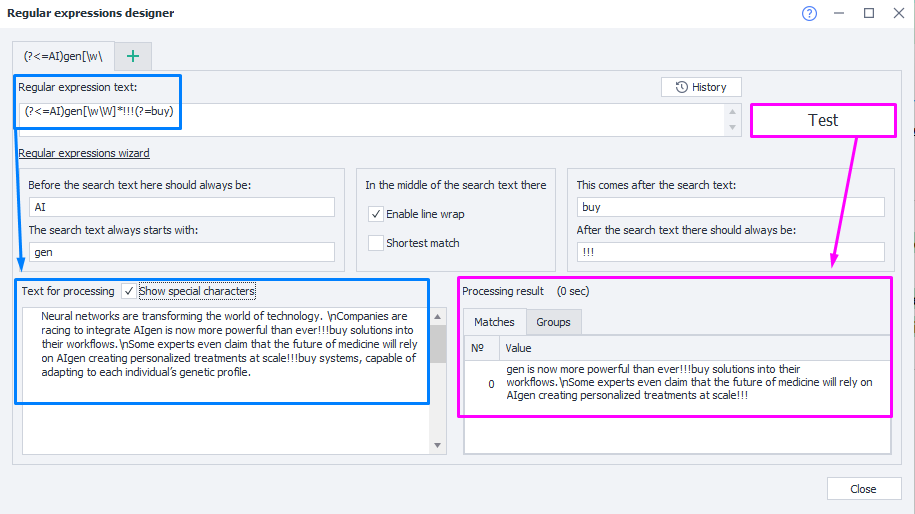
The text before/after the target text
Set what comes before and after the text you want to find. This content won’t be included in the expression’s result.
The target text always starts with/ends with
Here you specify what the found text should start or end with. This content will be included in the result.
Enable line wrap
Lets you search multi-line text. Otherwise, the search only works on the first line.
Shortest match
If you turn on this option, you’ll get the shortest possible match for your expression.
Text for processing
Paste in the text you want to extract your fragment from.
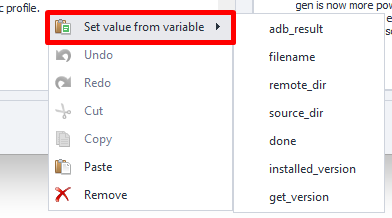
The dropdown will only show variables from the current project.
Show special characters
This setting determines if line breaks, tabs, etc., will be displayed as special symbols.
| Off | On |
|---|---|
 |  |
Processing result
- “Matches” tab
Shows the result of applying your regex to the text. - “Groups” tab
Shows results when your regex uses groups.
Usage example
Let’s take a common task as an example—parsing links. Say you have the HTML of a page and want to grab all links from the code, then save them in a List.
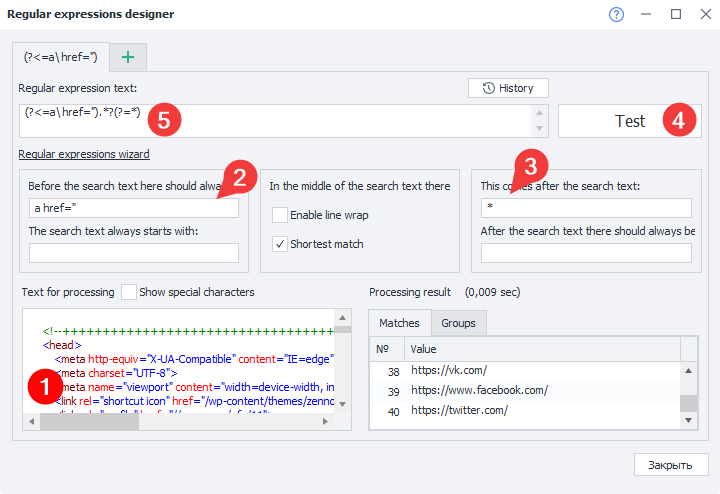
1. Paste your source code in the field—the one you’ll be extracting links from.
2. Indicate the tag that usually comes before a link—a href=”.
3. Add the closing quote after the link and enable Shortest match, since you only want the string between two quotes.
4. Test the new expression and check out the link list you get. If nothing shows up, try changing the search conditions.
5. Now you can copy the finished regex and use it in your own template.
If you need a specific match, look at ranges.
Special characters
Most characters in regular expressions mean themselves, but some are special characters.
For example: [ ] \ / ^ $ . | ? * + ( ) { }.
You can escape them with a backslash \ to make them literal in your regex.
So, a very simple regex looks like this: abc. It matches the string abc.
| Special character | Meaning | Example | Match |
|---|---|---|---|
* | Repeat previous character (0 or more times) | ab*c | abc, abbc, ac |
. | Matches any character (except newline) | a.c | aac, abc, acc |
+ | Repeat previous character (1 or more times) | ab+c | abc, abbc, abbbbc |
? | Repeat previous character (0 or 1 time) | a?c | abc, ac |
| | | OR operator | a | b | c | a, b, c |
() | Grouping | zennolab(com)+ | zennolabcom, zennolabcomcom |
[] | Character set, matches one character | zennoposter[57] | zennoposter5, zennoposter7 |
[^] | Exclude characters in set | [^0-9] | abc 123 |
- | Character range (inside square brackets) | [3-7], [а-д] | 3, 4, 5, 6, 7, а, б, в, г, д |
^ | Start of line | ^a | aaa aaa |
$ | End of line | a$ | aaa aaa |
{} | Number of repeats of previous character—{n} exactly n times; {m,n} from m to n; {m,} at least m times; {,n} not more than n times. | zen{2}oposter, (abc){2,3} | zennoposter, abcabc abcabcabc |
\ | Escape special characters | a\.b\.c | a.b.c |
\b | Word boundary | a\b, \ba | zennola, ab |
\B | Not a word boundary | \Ba | zennolab |
\s | Whitespace character | aaa\s?bbb (one or zero spaces) | aaa bbb, aaabbb |
\S | Non-whitespace character | a\S+bc | aaabc |
\d | Digit | abc\d+ | abc123 |
\D | Non-digit | abc123\D+ | abc |
\w | Any letter, digit, or underscore | \w+ | abc_123 |
\W | Any non-letter, non-digit, non-underscore (spaces or others) | \W+ | ₽ @$ & |
\r | Carriage return. Moves the cursor to the start of line, doesn’t start a new line. | Hello, World!\n This is a test.\r | This is a test. |
\n | New line. | This is a test.\r Another line.\n | Another line. |
\t | Tab/indentation. | Name\tAge\tCity | Name Age City |
Modifiers
They take effect from where you specify them to the end of the regex or until you turn them off.
| Modifier | What it does |
|---|---|
(?i) | Ignore case |
(?-i) | Make case matter again |
(?s) | Dot matches line breaks |
(?-s) | Dot does not match line breaks |
(?m) | Multiline search. ^ and $ match at line breaks. |
(?-m) | Multiline search off. ^ and $ only match at start and end of whole text. |
(?x) | Ignores whitespace in regex; # starts comments. |
(?-x) | Whitespace matters in regex; # isn’t allowed for comments. |
Lookahead and lookbehind
Search for text fragments by checking what’s around them (before or after), but not including that in the result.
Negative lookarounds are less common—they make sure something does not appear right before or after your target fragment.
| Pattern | Type | Example | Match |
|---|---|---|---|
(?=pattern) | Positive lookahead | Louis(?=XVI) | LouisXV, LouisXVI, LouisXVIII, LouisLXVII, LouisXXL |
(?!pattern) | Negative lookahead | Louis(?!XVI) | LouisXV, LouisXVI, LouisXVIII, LouisLXVII, LouisXXL |
(?<=pattern) | Positive lookbehind | (?<=Sergey )Ivanov | Sergey Ivanov, Igor Ivanov |
(?<!pattern) | Negative lookbehind | (?<!Sergey )Ivanov | Sergey Ivanov, Igor Ivanov |
Collection of handy regex patterns
E-mail address
(?i)[A-Z0-9._%+-]+@[A-Z0-9-]+.+.[A-Z]{2,4}
Phone number
+?(\d{1,3})?[- .]?(?(?:\d{2,4}))?[- .]?[\d-]{5,9}
IP address
(?:(?:25[0-5]|2[0-4][0-9]|[01]?[0-9][0-9]?)\.){3}(?:25[0-5]|2[0-4][0-9]|[01]?[0-9][0-9]?)
URL address
(https?:\/\/)?([\w\.]+)\.([a-z]{2,6}\.?)(\/[\w\.]*)*\/?
Extract file name and extension from path
(?<=\\)[^\.\\]*(\.[^\.]+){1,}$