Editing an Existing Proxy
Please read the Material Usage Rules on this site.
Description: This method modifies configuration of an existing proxy server based on specified parameters. Any parameters set to null will leave the corresponding property of the proxy unchanged.
Request parameters:
| Parameter | Type | Format | Default | Description |
|---|---|---|---|---|
| proxyId | string | uuid | (required) | Unique identifier of the proxy (required). |
| workspaceId | integer | int64 | -1 | Workspace identifier. -1 means the default workspace. |
| folderId | string | uuid | (empty) | New folder for the proxy. Set to empty to leave the current value unchanged. |
| name | string | (empty) | New name for the proxy. Set to null to retain the current name. | |
| proxyUri | string | (empty) | New URL for the proxy. Set to null to retain the current URL. | |
| ipChangeUrl | string | (empty) | New URL for IP rotation. Set to null to retain the current URL. |
note
The ID of the proxy to edit should be specified inside curly braces { } in the URL path.
Example request:
PUT
CURL:
curl 'http://localhost:8160/v1/proxies/123e4567-e89b-12d3-a456-426614174000?workspaceId=-1&folderId=123e4567-e89b-12d3-a456-426614174000&name=ApiEntity&proxyUri=http%3A%2F%2Flogin%3Apass%40127.0.0.1%3A8080&ipChangeUrl=https%3A%2F%2Fexample.com%2Fchange-ip' \
  --request PUT \
  --header 'Api-Token: YOUR_SECRET_TOKEN'
C#:
using System.Text;
var client = new HttpClient();
var request = new HttpRequestMessage
{
    Method = HttpMethod.Put,
    RequestUri = new Uri("http://localhost:8160/v1/proxies/123e4567-e89b-12d3-a456-426614174000?workspaceId=-1&folderId=123e4567-e89b-12d3-a456-426614174000&name=ApiEntity&proxyUri=http%3A%2F%2Flogin%3Apass%40127.0.0.1%3A8080&ipChangeUrl=https%3A%2F%2Fexample.com%2Fchange-ip"),
    Headers =
    {
        { "Api-Token", "YOUR_SECRET_TOKEN" },
    },
};
using (var response = await client.SendAsync(request))
{
    response.EnsureSuccessStatusCode();
    var body = await response.Content.ReadAsStringAsync();
    Console.WriteLine(body);
}
Cube:
http://localhost:8160/v1/proxies/{proxyId}?workspaceId=&folderId=&name=&proxyUri=&ipChangeUrl=
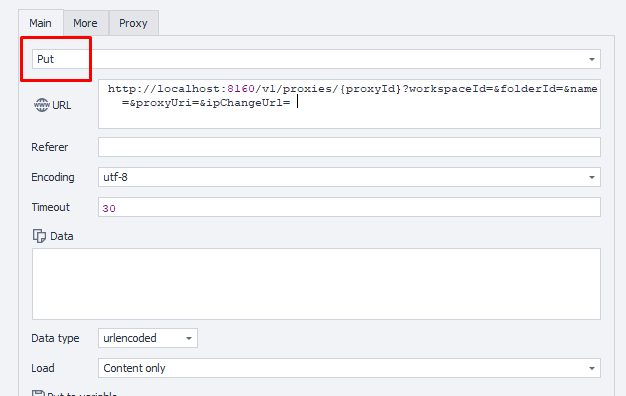
Additionally:
User-Agent: {-Profile.UserAgent-}
Api-Token: Token from UserArea2.
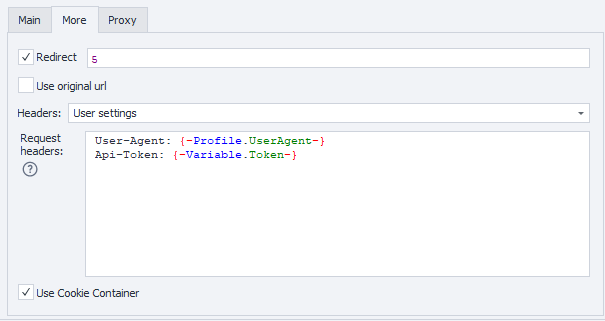
Response API:
| Response code | Result |
|---|---|
200 OK | OK |
401 Unauthorized | Unauthorized |
403 Forbidden | Forbidden |
500 Internal Server Error | Internal Server Error |
Success Response (200 OK):
No response body.
Error Response (500):
{
  "message": null
}