Getting Started with the ZennoBrowser API
Please read the Material Usage Rules on this site.
The API token is required to execute all requests. You can create it in UserArea2 and then pass it in the Api-Token header for every call.
Generate an API token
- Log in to UserArea2 with an active ZennoBrowser subscription.
- Open the ZennoBrowser section on the top panel.

- Click API Control.

- Enter a token name with at least 3 characters.

- Choose the token lifetime.
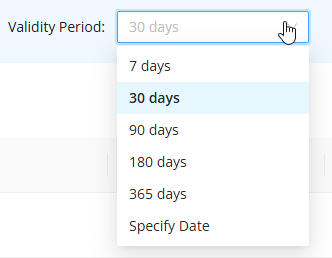
- Click Generate token.

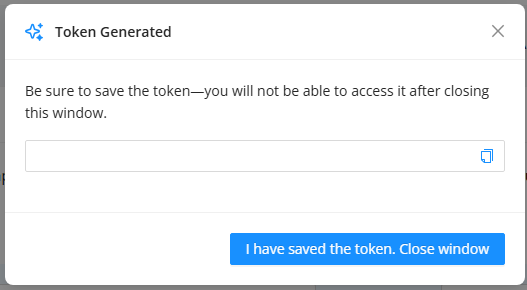
- Copy the generated token immediately. After closing the dialog, the token value can no longer be copied.
First request
A simple way to verify the token is to request the list of accessible workspaces.
GET
CURL:
curl 'http://localhost:8160/v1/workspaces?start=0&total=1000' \
  --header 'Api-Token: YOUR_SECRET_TOKEN'
C#:
var client = new HttpClient();
var request = new HttpRequestMessage
{
    Method = HttpMethod.Get,
    RequestUri = new Uri("http://localhost:8160/v1/workspaces?start=0&total=1000"),
    Headers =
    {
        { "Api-Token", "YOUR_SECRET_TOKEN" },
    },
};
using (var response = await client.SendAsync(request))
{
    response.EnsureSuccessStatusCode();
    var body = await response.Content.ReadAsStringAsync();
    Console.WriteLine(body);
}
Cube:
http://localhost:8160/v1/workspaces?start=0&total=1000
Expected response:
{
  "totalCount": 1,
  "items": [
    {
      "workspaceId": 1,
      "name": null,
      "role": "Owner"
    }
  ]
}
Parameter Encoding (URL Encoding)
If you construct HTTP requests manually, URL-encode parameter values that contain special characters.
This is especially important for values such as screen=HD+. If + is not encoded, the server will interpret it as a space.
| Character | Description | Encoded |
|---|---|---|
+ | Plus sign (for example HD+) | %2B |
| (space) | Space | %20 |
& | Ampersand | %26 |
= | Equals sign | %3D |
? | Question mark | %3F |
/ | Slash | %2F |
: | Colon | %3A |
C# example:
string screen = "HD+";
string url = $"http://localhost:8160/v1/profiles/create?name=ApiProfile&workspaceId=-1&screen={Uri.EscapeDataString(screen)}";
Python example:
params = {'screen': 'HD+'}
response = requests.post('http://localhost:8160/v1/profiles/create', params=params)