Updating Browser Profile
Please read the Material Usage Rules on this site.
Description: This method updates an existing browser profile.
Request parameters:
| Parameter | Type | Format | Default | Description |
|---|---|---|---|---|
| profileId | string | uuid | (required) | Unique identifier of the edited profile (required). |
| workspaceId | integer | int64 | -1 | Workspace identifier. -1 means the default workspace. |
| folderId | string | uuid | (empty) | New folder which the profile will be moved to (optional). |
| name | string | (empty) | New profile name. | |
| notes | string | (empty) | New profile notes (optional). | |
| tags | string | (empty) | Profile tags separated by spaces. (e.g. 1 2 3 4) | |
| screen | string | (empty) | Screen configuration settings. The allowed values are: "auto" to use value from fingerprint, "ignore" to use system value or "width x height" to set custom screen resolution (auto, ignore or or manual screen resolution entry, such as SVGA, WSVGA, HD+, etc. The complete list of manually configurable resolutions is provided below)"SVGA" = 800x600; "0.69M3" = 960x720; "0.59M9" = 1024x576; "WSVGA" = 1024x600; "0.66MA" = 1024x640; "XGA" = 1024x768; "1152x648" = 1152x648; "XGA+" = 1152x864; "HD" = 1280x720; "WXGA" = 1280x768; "WXGA+" = 1280x800; "SXGA-" = 1280x960; "SXGA" = 1280x1024; "1360x768" = 1360x768; "WXGA HD" = 1366x768; "SXGA+" = 1400x1050; "WSXGA" = 1440x900; "1.56M3" = 1440x1080; "1536x864" = 1536x864; "HD+" = 1600x900; "UXGA" = 1600x1200; "WSXGA+" = 1680x1050; "1832x1392" = 1832x1392; "FHD" = 1920x1080; "WUXGA" = 1920x1200; "2.76M3" = 1920x1440; "QWXGA" = 2048x1152; "QXGA" = 2048x1536; "3.32MA" = 2304x1440; "WQHD" = 2560x1440; "WQXGA" = 2560x1600; "QSXGA" = 2560x2048; "5.18MA" = 2880x1800; "4K UHD-1" = 3840x2160; "9.44M9" = 4096x2304; "5K" = 5120x2880; "8K UHD-2" = 7680x4320; | |
| cpu | string | (empty) | CPU configuration settings. The allowed values are: "auto" to use value from fingerprint, "ignore" to use system value or integer number to set custom processor core count (auto, ignore, or number of cores ("2/4", "4/8", "6/12", "8/16", "10/20", "12/24", "14/28", "16/32", "32/64", "64/128")) | |
| memory | string | (empty) | Memory configuration settings. Allowed values: "auto" - use the value from the fingerprint, "ignore" - use the system value, or an integer to specify a custom memory size (auto, ignore, or memory size ("2", "4", "8", "16", "32", "64", "128")) | |
| language | string | (empty) | Browser language settings. The allowed values are: "auto" to use value from fingerprint, "ignore" to use system value or language locale value (auto, ignorate, or locale: Russian - ru English (United States) - en-US German - de French - fr Spanish - es English (United Kingdom) - en-GB | |
| geoLocation | string | (empty) | Geographic location settings. The allowed values are: "auto" to use value from fingerprint, "ignore" to use system value. It is also possible to specify from one to seven floating point numbers that represent the following geo coordinates: Latitude, Longitude, Altitude, Accuracy, AltitudeAccuracy, Heading, Speed, Radius. Some coordinates can be skipped. For example, the following value sequence is valid: 10, , 40, , 60, 70 - means Latitude = 10, Longitude = random, Altitude = 40, Accuracy = random, AltitudeAccuracy = 60, Heading = 70, Speed = random, Radius = random (auto, ignore or coordinates (latitude, longitude, etc.)) | |
| timeZone | string | (empty) | Timezone settings. The allowed values are: "auto" to use value from fingerprint, "ignore" to use system value or custom timezone value (auto, ignore, or specific value (e.g. Europe/Moscow)) | |
| webGl | string | (empty) | WebGL configuration settings. The allowed values are: "auto" to use value from fingerprint, "ignore" to use system value. (auto or ignore) | |
| webGpu | string | (empty) | WebGPU configuration settings. The allowed values are: "on" to enable or "off" to disable this feature.(on or off) | |
| webRtc | string | (empty) | WebRTC configuration settings. The allowed values are: "Emulate" to use value from fingerprint, "Real" to use system value or "Hide" to disable this feature.(Emulate, Real or Hide) | |
| domRect | string | (empty) | DOM Rectangle configuration settings. The allowed values are: "Ignore" to disable this feature or "Noise" to use dom rect noising.(Ignore or Noise) | |
| audio | string | (empty) | Audio configuration settings. The allowed values are: "on" to enable or "off" to disable this feature. (on or off) | |
| fonts | string | (empty) | Font configuration settings. The allowed values are: "on" to enable or "off" to disable this feature. (on or off) | |
| battery | string | (empty) | Battery configuration settings. The allowed values are: "on" to enable or "off" to disable this feature. (on or off) | |
| plugins | string | (empty) | Browser plugins configuration. The allowed values are: "on" to enable or "off" to disable this feature. (on or off) | |
| speechVoices | string | (empty) | Speech voices configuration. The allowed values are: "on" to enable or "off" to disable this feature. (on or off) | |
| canvas | string | (empty) | Canvas settings. The allowed values are: Ignore to disable this feature or Noise to use noising. | |
| mediaDevices | string | (empty) | Media devices settings. The allowed values are: auto to use value from fingerprint, ignore to use real values or custom location values. You can specify from one to three integer numbers that represent the following values: AudioInput, AudioOutput and VideoInput The numbers can be skipped. For example, the following values are valid: 1,,5 - means AudioInput = 1, AudioOutput = random, VideoInput = 5 | |
| commandLineArguments | string | (empty) | Custom command line arguments to pass to the browser on startup | |
| proxyServerId | string | (empty) | Proxy server ID configuration. Use null to keep unchanged, empty string to clear the proxy, or provide a valid GUID to set a new proxy server | |
| presetId | string | (empty) | Preset identifier to apply. Use null to keep unchanged, empty string to remove the preset, or a GUID to set a new preset. | |
| imagesVideosDownload | string | (empty) | Images and videos download configuration. Allowed values: on to enable or off to disable. Use an empty string to keep the current value. | |
| windowSizeFromFingerprint | string | (empty) | Open the browser window exactly in the profile fingerprint screen resolution. Allowed values: on to enable or off to disable. Use an empty string to keep the current value. |
note
The ID of the profile to update should be specified inside curly braces { } in the URL path.
Example request:
PUT
CURL:
curl 'http://localhost:8160/v1/profiles/123e4567-e89b-12d3-a456-426614174000?workspaceId=-1&folderId=123e4567-e89b-12d3-a456-426614174000&name=ApiEntity¬es=Created%20from%20API&tags=tag1%20tag2&screen=1920%20x%201080&cpu=8%2F16&memory=8&language=en-US&geoLocation=55.7558%2C37.6176&timeZone=Europe%2FMoscow&webGl=auto&webGpu=on&webRtc=Emulate&domRect=Noise&audio=on&fonts=on&battery=on&plugins=on&speechVoices=on&canvas=Noise&mediaDevices=1%2C1%2C1&commandLineArguments=--disable-gpu&proxyServerId=123e4567-e89b-12d3-a456-426614174000&presetId=123e4567-e89b-12d3-a456-426614174000&imagesVideosDownload=on&windowSizeFromFingerprint=on' \
--request PUT \
--header 'Api-Token: YOUR_SECRET_TOKEN'
C#:
using System.Text;
var client = new HttpClient();
var request = new HttpRequestMessage
{
Method = HttpMethod.Put,
RequestUri = new Uri("http://localhost:8160/v1/profiles/123e4567-e89b-12d3-a456-426614174000?workspaceId=-1&folderId=123e4567-e89b-12d3-a456-426614174000&name=ApiEntity¬es=Created%20from%20API&tags=tag1%20tag2&screen=1920%20x%201080&cpu=8%2F16&memory=8&language=en-US&geoLocation=55.7558%2C37.6176&timeZone=Europe%2FMoscow&webGl=auto&webGpu=on&webRtc=Emulate&domRect=Noise&audio=on&fonts=on&battery=on&plugins=on&speechVoices=on&canvas=Noise&mediaDevices=1%2C1%2C1&commandLineArguments=--disable-gpu&proxyServerId=123e4567-e89b-12d3-a456-426614174000&presetId=123e4567-e89b-12d3-a456-426614174000&imagesVideosDownload=on&windowSizeFromFingerprint=on"),
Headers =
{
{ "Api-Token", "YOUR_SECRET_TOKEN" },
},
};
using (var response = await client.SendAsync(request))
{
response.EnsureSuccessStatusCode();
var body = await response.Content.ReadAsStringAsync();
Console.WriteLine(body);
}
Cube:
http://localhost:8160/v1/profiles/{profileId}?workspaceId=-1&folderId=a2f76986-8064-4c2f-b109-64a84b4ce137&name=NewName¬es=Note123&tags=tag1 tag2&imagesVideosDownload=on&windowSizeFromFingerprint=on
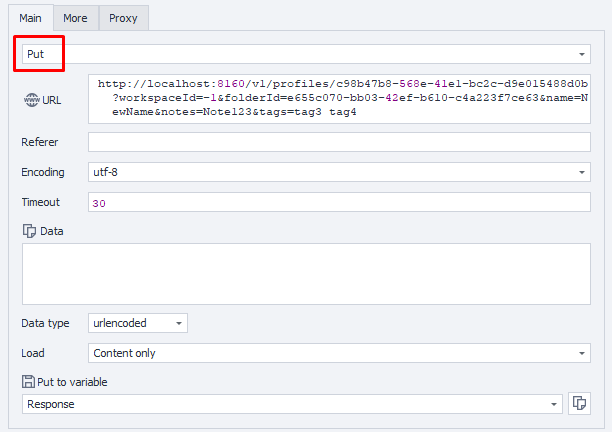
Additionally:
User-Agent: {-Profile.UserAgent-}
Api-Token: Token from UserArea2.
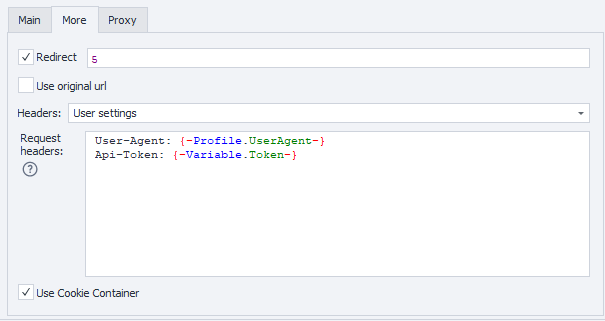
Response API:
| Response code | Result |
|---|---|
200 OK | OK |
401 Unauthorized | Unauthorized |
403 Forbidden | Forbidden |
500 Internal Server Error | Internal Server Error |
Success Response (200 OK):
No response body.
Error Response (500):
{
  "message": null
}