System Requirements
Please read the Material Usage Rules on this site.
For Lite and Professional versions.
At a minimum, you'll need:
- Processor: Intel or AMD with at least 2 cores, each at 2 GHz or faster.
- RAM: at least 4 GB.
- Storage space: at least 6 GB free.
- Video memory: at least 1024 MB.
- Direct X 11+ or OpenGL 2.0 required.
- Operating system: Windows 10 x64 or later
Windows Server 2019–2025 (Server Core not supported). - .Net Framework 2.0, 3.5, and 4.8+ are required.
- Visual C++ redistributables for 2008, 2010, 2013, 2015, 2017, 2019 (x86 or x64) are also needed.
- Administrator rights. You'll need them to install and run the program.
- Hardware virtualization.
- Internet connection. Mandatory. The program won't work without it.
For the Enterprise version.
At a minimum, you'll need:
- Processor: Intel or AMD with at least 2 cores, each at 2 GHz or faster.
- RAM: at least 4 GB.
- Storage space: at least 6 GB free.
- Video memory: discrete graphics card required.
- Operating system: Windows 10 x64 or later
Windows Server 2019–2025 (Server Core not supported). - .Net Framework 4.8+ required.
- Visual C++ redistributables for 2013, 2015, 2017, 2019, and 2022 also needed.
- Administrator rights. You'll need them to install and run the program.
- Internet connection. Mandatory. The program won't work without it.
How do you check your system with Memu?
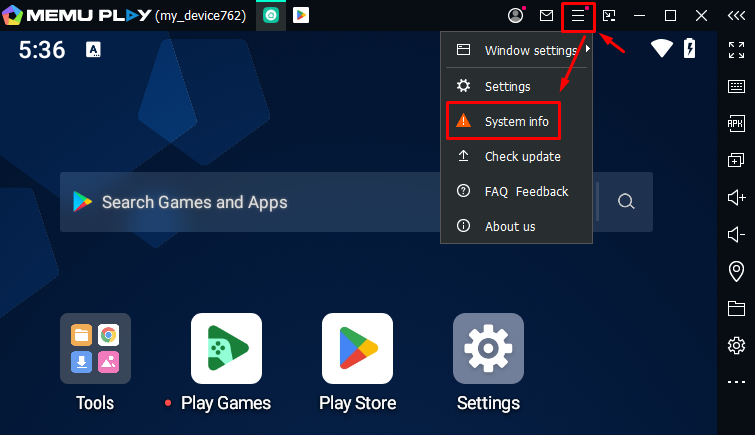
Launch the emulator, go to the menu, and select System Info.
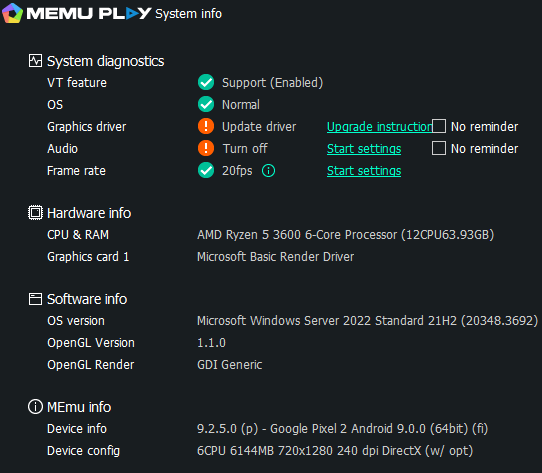
It will look like this: